
Test report · 18 September 2026
How Accurate Is AI Image to Layers? 15 Runs, Measured
In 15 test runs at 1K, every text layer IntoLayers returned was character-for-character correct — including five runs on heavily compressed JPEGs. Split into six layers, small elements came back enlarged: a median of 2.17× and up to 5.43× the size they occupy in the original. Here is how we tested, and what it still gets wrong.
Everything below comes from one round of testing on 18 September 2026: 15 conversions at the 1K size, six layers each, across five layouts that have nothing in common. Two notes from a later test are dated where they appear. No number on this page is an estimate, and none of it is a comparison — we measured our own output only.
15 / 15
Runs with every character correct
2.17×
Median enlargement of element layers
at 3 or more layers
82 s
Median time for a 6-layer run at 1K
range 60–99 s
15 / 15
Runs that returned the layer count asked for
How did we test it?
We put the same five images through the converter 15 times at the 1K size, asked for six layers every time, and read the text back out of the returned layers with OCR.
The five test images
A plant-shop poster (900 × 1244), an event flyer with six lines of 34 px serif body copy, a perfume poster set in a thin serif, a podcast cover with light type on near-black, and a clearance price tag carrying prices, opening times and a promo code. Four of the five were drawn from scratch, so the exact string in every text block is known and can be compared character by character.
How the text was scored
macOS Vision OCR with language correction switched off — left on, it guesses a blurred word back into the correct spelling and hides the exact damage we were trying to measure. The score is normalised edit distance, not whether the sentence matches, because that would record one wrong letter and completely illegible as the same result.
The instrument was calibrated first
Read straight off the five originals, before any conversion, OCR scored 100.0%. Every point lost after the split can therefore only come from the conversion, not from the reader.
Ten clean runs, five compressed
Ten runs used the original PNGs. Five more used JPEG copies saved at quality 60 with 4:2:0 chroma subsampling — the setting that smears the edges of coloured text the most. Layer count, size tier and prompt were identical across all 15.
A 6-layer conversion at 1K costs 30 credits, five per layer. See what a conversion costs.
Does the text stay readable?
Yes. In 15 of 15 runs, every character of every text layer came back correct — including all five runs on quality-60 JPEGs.
| Test image | Input | Base layer | Characters correct | Time |
|---|---|---|---|---|
| Plant-shop poster | PNG | 880 × 1216 | 100% | 98 s |
| Plant-shop poster | PNG | 880 × 1216 | 100% | 99 s |
| Plant-shop poster | JPEG q60 | 880 × 1216 | 100% | 72 s |
| Event flyer, 34 px serif body | PNG | 864 × 1152 | 100% | 78 s |
| Event flyer, 34 px serif body | PNG | 864 × 1152 | 100% | 90 s |
| Event flyer, 34 px serif body | JPEG q60 | 864 × 1152 | 100% | 60 s |
| Perfume poster, thin serif | PNG | 864 × 1152 | 100% (89.2%) | 82 s |
| Perfume poster, thin serif | PNG | 864 × 1152 | 100% | 77 s |
| Perfume poster, thin serif | JPEG q60 | 864 × 1152 | 100% | 61 s |
| Podcast cover, light on near-black | PNG | 864 × 1152 | 100% | 91 s |
| Podcast cover, light on near-black | PNG | 864 × 1152 | 100% | 90 s |
| Podcast cover, light on near-black | JPEG q60 | 864 × 1152 | 100% | 66 s |
| Clearance price tag | PNG | 864 × 1152 | 100% | 83 s |
| Clearance price tag | PNG | 864 × 1152 | 100% (99.7%) | 82 s |
| Clearance price tag | JPEG q60 | 864 × 1152 | 100% | 66 s |
About the two runs marked with a bracket
Two runs first scored below 100%: the perfume poster at 89.2% and the price tag at 99.7%. Reading those two layers again at double size returned the correct strings — EST. 1987, 100 ml, customer — so the characters were in the file and the reader misread them. Had the conversion damaged the letterforms, enlarging the image could not have brought them back. The table shows both runs corrected, with the raw score in brackets.
Why does small text survive?
Because element layers do not come back at the size they occupy in the picture. They come back larger, and the smaller the element, the larger the factor. Across the 75 element layers in these 15 runs the median was 2.17×, and the largest was 5.43×.
Small text only gets this when the image is split into three or more layers: in a 2-layer run the text does not come back on a layer of its own. See the 2-layer section below.
| Area on the canvas | Layers | Median enlargement |
|---|---|---|
| Under 20k px | 3.55×n = 23 | |
| 20k – 60k px | 2.99×n = 22 | |
| 60k – 150k px | 1.74×n = 18 | |
| 150k – 400k px | 1.63×n = 9 | |
| Over 400k px | 1.00×n = 3 |
1× — original size · Linear enlargement of each element layer against the area of the box it occupies on the 1K canvas. 75 element layers from 15 runs at six layers each. A 1.00× reading means the layer came back at the size it occupies.
The two most enlarged elements in the set
Original region, scaled up

Layer as returned
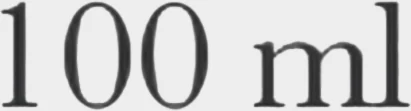
Original region, scaled up

Layer as returned

Is it just higher resolution?
No, and we checked by taking the resolution away. Every layer of every run was scaled down to 0.4 megapixels and read again: the text stayed 99.6% readable on the ten clean runs and 98.6% on the five compressed ones.
If size were doing the work, shrinking the layers would break the text. It did not. What the conversion changes is how densely each element is sampled, not how big the page is.
The canvas does not get bigger — it gets smaller
At the 1K tier a 1200 × 1600 upload comes back on an 864 × 1152 base layer. The picture as a whole is smaller than what you uploaded; the individual elements are the part that gains pixels. Picking 2K gives you a larger canvas, not a sharper one.
Does JPEG compression break it?
Not at quality 60. All five runs on compressed copies scored 100% on every text layer — a cleaner sheet than the uncompressed batch, which is where both OCR misreads happened.
The compressed originals were calibrated the same way as the clean ones and still read at 100.0%, so the inputs were degraded but not already broken.
The inputs really were degraded
Three of the five compressed files came out larger than the PNGs they were made from — by 4%, 46% and 82%. PNG compresses flat colour extremely well, while quality-60 JPEG spends its bits generating artefacts along every sharp edge. Bigger files are the evidence that the artefacts are there.
Scaled down to 0.4 megapixels afterwards, the compressed batch still averaged 98.6% readable.
Does a 2-layer run show the enlargement?
Not for small text. In both 2-layer runs of this test, every element came back merged into one block at exactly its original size — 1.00×.
The result was the rebuilt background plus a single layer holding the elements. That block covered 739 × 1011 px and 659 × 1057 px on an 864 × 1152 canvas — about three quarters and seven tenths of the page — so there was no small element left to enlarge.
What a 2-layer run is good for instead
Text-on-background designs. In both runs the rebuilt background came back with no leftover text at all, and differed from the known clean background by an average of 1.84 and 8.89 levels out of 255 — a base you can retype a price or a date onto. A 2-layer run took about 45 seconds.
To get each element on its own layer, and with it the enlargement measured above, ask for three or more layers.
It is not always one merged block. On an AI poster with a large illustrated subject (tested on 21 September), a 2-layer run lifted out only the subject — enlarged 1.36× — and left all of the text in the background layer, where it cannot be retyped. Three layers took the text off on its own.
Do you get the number of layers you ask for?
Yes. We asked for six every time and got exactly six back in 15 of 15 runs, across five layouts with nothing in common.
The counts on offer are 2, 3, 5, 7, 9, or Auto, which decides for itself and has returned anywhere between 2 and 17. The rebuilt background counts as one of them. A low count does not cut elements off the end — it merges them by meaning, which is why a 2-layer run hands back one block rather than one element and a pile of leftovers.
How long does it take?
A 6-layer conversion at 1K took a median of 82 seconds across the 15 runs, ranging from 60 to 99. A 2-layer run took about 45 seconds.
Measured end to end, from submitting the image to the run reporting itself finished, checked every four seconds. Larger output sizes and higher layer counts take longer than the runs on this page.
What does it still get wrong?
Four things, none of which the numbers above fix.
The text is a picture of text
Text comes back as a raster layer, not as live editable type. You can move it, scale it, mask it or paint it out; you cannot put a cursor in it and retype the word in place.
Hidden parts are a guess, when they are drawn at all
What sits behind another element was never in the picture, so it cannot be recovered. On a simple shape partly covered by another, an earlier test stopped the layer at the visible edge in three runs out of three. On a cartoon character tested on 21 September, the hidden parts of the torso, the head under a helmet and a bike frame behind the rider were redrawn — plausibly, but invented, and the hand gripping a bag strap came back in a different pose. Check covered areas before you rely on them.
It rebuilds, it does not recover
What you get is an editable approximation of the picture, not the file it was made from. Stacking the returned layers back over the original leaves an average difference of 6.88 levels out of 255 — nothing you would see side by side, but it is not pixel-identical, and no conversion can hand back layers a design once had.
Two layers can leave the text behind
The 2-layer result above holds for designs where text sits on a plain background — the flyer and the price tag. On an AI poster with a large illustrated subject, a 2-layer run lifted out only the subject and left the text baked into the background; at three layers the text came off on a layer of its own.
What this test did not cover
Photographs of printed pages and scans. Compression and downscaling happening together — we changed one at a time on purpose. Real client files: these were five built layouts, not a random sample. And any other tool — we have no measurements of anyone else's output, so nothing here should be read as a comparison.
Try it on your own image
The fastest way to check these numbers is to run one of your own images and read the layers yourself.
Only upload images you have the right to edit.